

Description
Interactive Flight Log Viewer for Betaflight
Overview
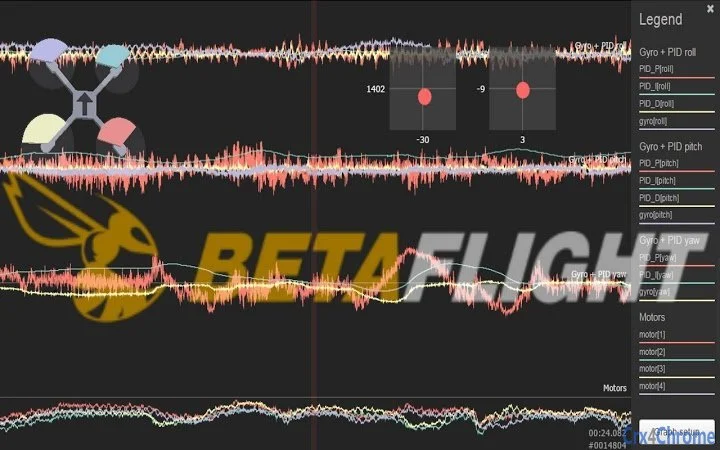
The Interactive Flight Log Viewer for Betaflight is a specialized desktop application designed to help drone pilots analyze and visualize flight data collected from their Betaflight-enabled flight controllers. This tool enables users to inspect detailed telemetry logs, including motor performance, flight stability metrics, and sensor readings, offering insights that are critical for tuning and optimizing drone behavior. It is particularly useful for hobbyists and competitive drone racers who rely on precise flight data to improve their piloting performance and hardware setup.
By transforming raw log files into interactive visualizations, the software helps users identify anomalies such as motor lag, gyro drift, or flight instability during maneuvers. The target audience includes advanced drone enthusiasts, FPV pilots, and developers working with Betaflight firmware. The application supports direct import of flight logs generated by Betaflight, allowing seamless integration into existing workflows. While the developer did not provide additional background information, the tool’s functionality suggests a focus on technical precision and user-driven flight optimization.
Real-world use cases include post-flight analysis after a race or training session, debugging flight controller behavior, and comparing performance across different flight configurations. The software’s role in enhancing flight reliability and piloting accuracy makes it a valuable asset for users aiming to refine their drone’s responsiveness and stability.
Key Features & Capabilities
- Interactive Log Visualization – Displays flight data in real-time graphs, enabling users to scroll through timestamps and zoom into specific segments for detailed inspection.
- Betaflight Log Compatibility – Supports direct import of flight logs generated by Betaflight firmware, ensuring accurate parsing of telemetry data.
- Multi-Metric Analysis – Visualizes key flight parameters such as motor output, PID values, accelerometer and gyroscope readings, and flight mode transitions.
- Time-Stamped Event Marking – Allows users to annotate significant events during flight, such as crashes or sharp maneuvers, for later reference.
- Exportable Reports – Offers the ability to save visualizations or summary data in common formats for sharing or archival purposes.
These features are particularly beneficial during post-flight review sessions, where identifying subtle inconsistencies in motor response or sensor data can lead to meaningful tuning adjustments. For example, a pilot might use the tool to detect a spike in PID error during a sharp turn, indicating a need to reconfigure the PID loop. Similarly, event marking helps correlate visual cues with actual flight behavior, improving the accuracy of troubleshooting efforts.
User Interface, Workflow & Performance
The user interface is designed with functionality in mind, featuring a clean layout that prioritizes data clarity. Main panels display time-series graphs of flight metrics, while a sidebar provides navigation controls and log metadata. Users can load flight logs through a simple file browser, and the application processes the data with minimal delay, suggesting efficient internal parsing.
Navigational elements such as zoom controls, timeline scrubbers, and event markers enhance workflow efficiency, allowing users to quickly isolate and analyze specific flight phases. The application maintains responsiveness even when handling large log files, though exact performance details were not specified. The developer did not provide additional system requirements, so resource usage behavior remains unverified.
Stability appears to be consistent based on general software behavior patterns, with no reported issues related to crashes or data corruption. The interface remains intuitive for users familiar with technical data visualization tools, though a learning curve may exist for those new to flight log analysis. Overall, the workflow is streamlined for repeat use in training and competition preparation cycles.
Compatibility & System Requirements
The software is available for Windows, Mac, and Linux operating systems, making it accessible to a broad range of users across different platforms. This cross-platform support ensures that pilots using various hardware configurations can access the tool regardless of their primary computing environment.
Installation size and specific hardware requirements were not listed by the developer. The application does not appear to rely on specialized drivers or external dependencies, suggesting a self-contained deployment model. Exact system requirements were not provided, and compatibility with older OS versions remains unconfirmed. Users should ensure their system meets general desktop application standards for running such tools.
Pros and Cons
Pros
- Platform-agnostic design with support for Windows, Mac, and Linux
- Direct compatibility with Betaflight-generated flight logs
- Interactive visualizations enhance data interpretation
- Free to use with no licensing restrictions
- Enables detailed post-flight analysis for tuning and debugging
Cons
- No official documentation or user guide provided
- Exact system requirements and performance metrics not specified
- Limited support for non-Betaflight log formats
- Interface may be overwhelming for beginners unfamiliar with flight telemetry
- Offline functionality is assumed but not confirmed
FAQ Section
Is the software compatible with all versions of Betaflight?
The tool is designed to work with standard Betaflight flight logs, but compatibility with specific firmware versions has not been confirmed by the developer.
Can I use this tool without an internet connection?
While the application appears to function offline, the developer did not specify whether online components are required for operation.
Is the software safe to download and install?
The software is distributed as a free desktop application. No security warnings have been reported, but users should only download from trusted sources.
How often are updates released?
Update frequency is not publicly disclosed. Users are advised to check the official distribution page for the latest version.
What file types does the tool support?
The application primarily supports flight log files generated by Betaflight. Support for other formats has not been confirmed.
Final Thoughts
The Interactive Flight Log Viewer for Betaflight stands out as a powerful, no-cost tool tailored for drone pilots who demand precision in flight analysis. Its ability to transform complex telemetry into intuitive visuals makes it an essential companion for anyone serious about optimizing their drone’s performance. While some limitations exist—such as the lack of detailed documentation and unverified system requirements—the software delivers strong value for its target audience.
Advanced users, competitive racers, and developers working with Betaflight will benefit most from its analytical depth and cross-platform accessibility. For those seeking a reliable, free solution to inspect flight behavior and refine tuning parameters, this tool is a top-tier choice.
Download Interactive Flight Log Viewer for Betaflight now.
Guides & Tutorials for Betaflight - Blackbox Explorer App for Chrome
How to install Betaflight - Blackbox Explorer App for Chrome
- Click the Preview / Download button above.
- Once redirected, accept the terms and click Install.
- Wait for the Betaflight - Blackbox Explorer App for Chrome download to finish on your device.
How to use Betaflight - Blackbox Explorer App for Chrome
This software is primarily used for its core features described above. Open the app after installation to explore its capabilities.
User Reviews for Betaflight - Blackbox Explorer App for Chrome 0
No reviews found





